9:16 Aspect Ratio Calculator
Last updated:
This 9:16 calculator finds the missing width or height for any vertical image or video. Type one dimension and it calculates the other, rounded to the nearest whole pixel so the result is ready to use.
9:16 Calculator
Use this 9:16 size converter to resize any image or video. Enter a width or a height and the other value updates.
Standard Shorts/Reels/TikTok format
Calculated Ratio
9:16
What is the 9:16 aspect ratio?
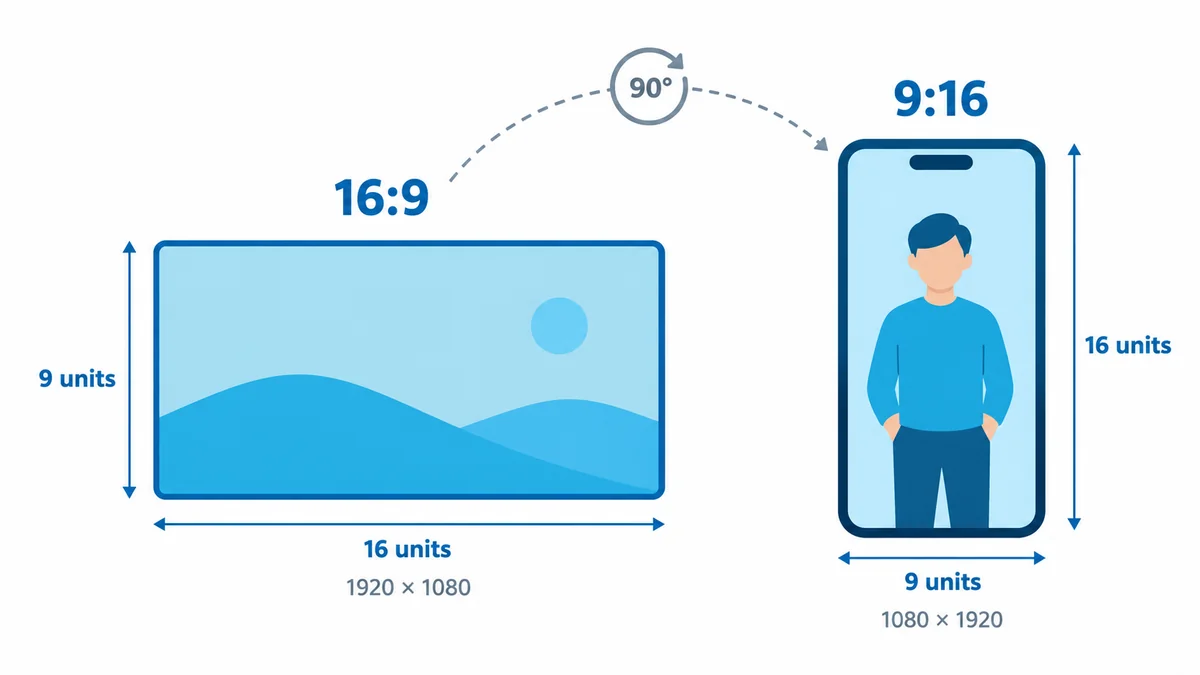
The 9:16 aspect ratio is a vertical format that is 9 units wide and 16 units tall. In pixels, that is most often 1080 wide by 1920 tall, which matches the shape of a phone held upright and explains why it became the standard vertical aspect ratio for short videos.
Think of 9:16 as 16:9 turned on its side, because a 16:9 frame is wide, like a television, while a 9:16 frame is tall, like a phone. If you also work in landscape, the 16:9 aspect ratio calculator handles the wide version.
As a decimal, 9 ÷ 16 = 0.5625, which means the height is about 1.78 times the width. You will also see it written as the 9 16 aspect ratio, 9x16 or simply portrait aspect ratio, and they all describe the same shape. It is the usual vertical video aspect ratio for any 9:16 video you make for a phone.
What size is 9:16 in pixels?
9:16 in pixels has no single size, because a ratio describes a shape rather than a measurement. Any width and height that reduce to 9 and 16 make a 9:16 frame, but the most common 9:16 size is 1080 × 1920, also called vertical Full HD.
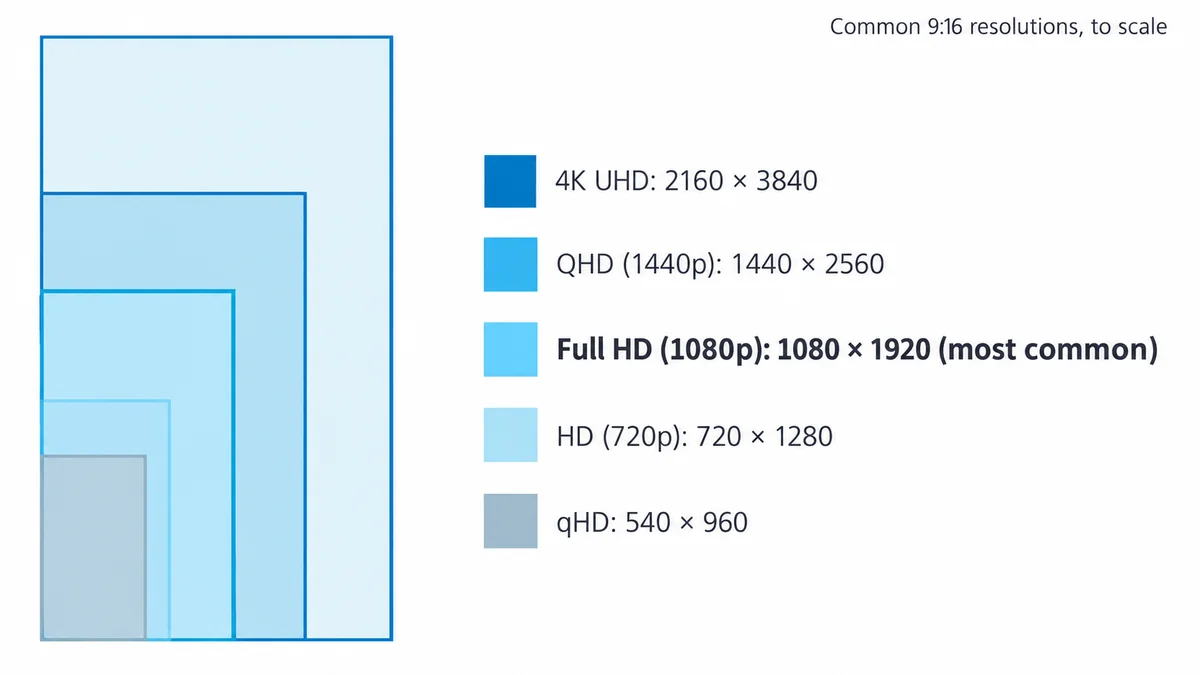
A higher 9:16 resolution gives you a sharper picture but a bigger file, while lower resolutions upload faster but can look soft on a large phone. The table lists the five 9:16 dimensions you will come across most often.
| Name | Width × height (pixels) | Common use |
|---|---|---|
| qHD | 540 × 960 | Previews and slow connections |
| HD (720p) | 720 × 1280 | Lighter uploads |
| Full HD (1080p) | 1080 × 1920 | Most common size for TikTok, Reels, Shorts and Stories |
| QHD (1440p) | 1440 × 2560 | High-quality exports |
| 4K UHD | 2160 × 3840 | Master files and editing |
The 9:16 4K resolution, 2160 × 3840, is best kept for master files you plan to edit. Our guide to aspect ratio vs resolution explains why the shape and the pixel count are two separate settings. For other video shapes, try the video aspect ratio calculator.
Is 1080x1920 a 9:16 ratio?
Yes, 1080x1920 is an exact 9:16 ratio. Divide both sides by 120 and you get 1080 ÷ 120 = 9 and 1920 ÷ 120 = 16. It is the same Full HD frame as 1920 × 1080 rotated 90 degrees, so if a brief asks for vertical 1080p, this is the size it means.
What is the best 9:16 image size?
The best 9:16 image size for most uses is 1080 × 1920 pixels, which works for Stories, phone wallpapers and vertical posts. If you plan to print or crop later, start bigger at 2160 × 3840 and scale down when you export. The same 9:16 photo size rule applies at any scale, so as long as the width and height keep a 9 to 16 relationship, the picture will not stretch or squash.
Which AI image sizes are 9:16?
Few AI image sizes are exactly 9:16, although the tall options come close. DALL·E 3 offers a tall size of 1024 × 1792 [7], which works out to 4:7, or 0.571, while a true 9:16 frame is 0.5625.
The difference is small, so trimming 16 pixels off the width gives you 1008 × 1792, an exact 9:16 frame. Newer GPT Image models list 1024 × 1536 as their portrait size, which is 2:3 [8]. That shape is wider, so you need a bigger crop of 160 pixels to reach 864 × 1536.
How do you calculate 9:16 dimensions?
To calculate 9:16 dimensions, multiply the width by 16 and divide by 9 to get the height. To go the other way, multiply the height by 9 and divide by 16, which is exactly what the 9:16 ratio calculator at the top of this page does for you.
Height = width × 16 ÷ 9
Width = height × 9 ÷ 16
9:16 as a decimal = 9 ÷ 16 = 0.5625
Here are four worked examples:
- Width 1080: 1080 × 16 ÷ 9 = 1920, so the size is 1080 × 1920.
- Width 720: 720 × 16 ÷ 9 = 1280, so the size is 720 × 1280.
- Height 1600: 1600 × 9 ÷ 16 = 900, so the size is 900 × 1600.
- Width 1000: 1000 × 16 ÷ 9 = 1777.8. Round to 1778, so the size is 1000 × 1778.
Pixels have to be whole numbers, which is why the last example rounds. A width that divides evenly by 9 always gives a clean height, and other widths leave an error of less than one pixel that nobody will ever notice.
To check whether a size is already 9:16, divide both numbers by their greatest common divisor (GCD). For 1080 and 1920 the GCD is 120, which leaves 9 and 16, and any other pair means the frame is a different shape.
Which platforms use the 9:16 aspect ratio?
TikTok, Instagram Reels and Stories, YouTube Shorts, Facebook Stories and Snapchat all use the 9:16 aspect ratio for full-screen vertical video. Their official guides list different sizes, from a 540 × 960 minimum on TikTok [1] to 1440 × 2560 in Meta's ad specs [2]. A 1080 × 1920 export sits comfortably in the middle and is the size most people work with. Platform specifications change, so check each help page before a big launch, because this table only reflects the official guidance at the time of writing.
| Platform | Format | Ratio | Official size guidance | More detail |
|---|---|---|---|---|
| TikTok | Video | 9:16 | 9:16 recommended, at least 540 × 960 [1] | TikTok video sizes |
| Reels | 9:16 | 1440 × 2560 for ads [2] | Instagram Reels sizes | |
| Stories | 9:16 | 1440 × 2560 for ads [3] | Instagram Stories sizes | |
| YouTube | Shorts | Vertical | Vertical upload, up to 1080p [4] | YouTube Shorts sizes |
| Stories | 9:16 | 1440 × 2560 for ads [5] | Facebook Stories sizes | |
| Snapchat | Snap ads | 9:16 | 1080 × 1920 [6] | Snapchat ad sizes |
The Reels aspect ratio is 9:16, and Meta recommends 1440 × 2560 for Reels ads [2], although a Full HD export keeps the same shape with a smaller file for everyday posts. Instagram Stories use the same 9:16 shape and the same recommended ad size [3].
What is the 9:16 safe zone?
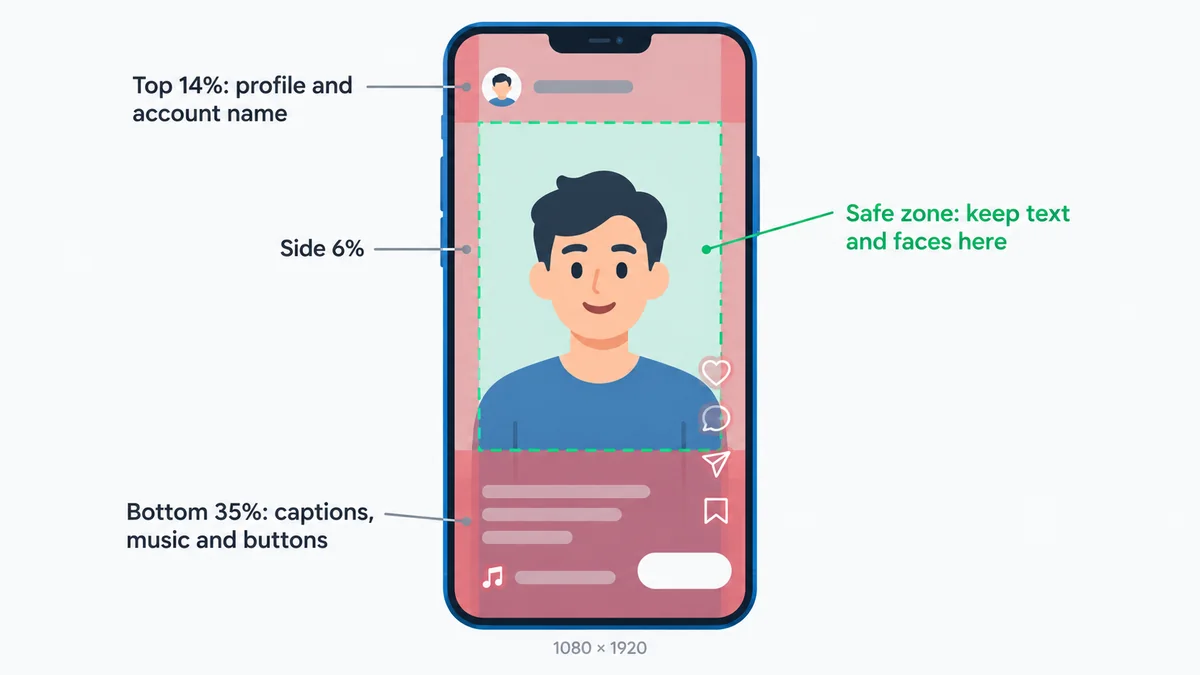
The 9:16 safe zone is the middle part of the frame that app buttons and captions do not cover. On TikTok, Reels and Shorts, the account name usually sits near the top, while the caption, likes and share buttons run along the bottom and right side.
Meta suggests keeping about 14% of the top, 35% of the bottom and 6% of each side free of text [2]. On a Full HD frame, that is roughly 270 pixels at the top and 670 at the bottom. Snapchat asks you to keep the top 150 pixels and the bottom 330 pixels clear [6], and TikTok shares its own safe zone files inside Ads Manager [1].
What is the difference between 9:16 and 16:9?
The difference between 9:16 and 16:9 is orientation, because they are the same shape rotated 90 degrees. 16:9 is landscape at 1920 × 1080, designed for YouTube, televisions and monitors, while 9:16 is portrait at 1080 × 1920, designed for phones held upright.
Problems start when you show one inside the other. A 16:9 video on an upright phone gets black bars above and below, which is called letterboxing, and a 9:16 video on a television gets bars down both sides, which is called pillarboxing. The other option is to crop, but cutting a 9:16 frame out of 16:9 footage throws away about two-thirds of the picture, so it pays to plan your shots with that in mind.
| Feature | 9:16 | 16:9 |
|---|---|---|
| Orientation | Portrait (vertical) | Landscape (horizontal) |
| Standard size | 1080 × 1920 | 1920 × 1080 |
| Decimal (width ÷ height) | 0.5625 | 1.78 |
| Main uses | TikTok, Reels, Shorts, Stories | YouTube, TV, monitors, slides |
And yes, 1920 × 1080 is a true 16:9 resolution, just as its rotated twin is a true 9:16 one. Going from 9:16 to 16:9 is the same problem in reverse, so use the 16:9 aspect ratio calculator for landscape sizes.
Is 9:16 the same as 4:5?
No, 9:16 is not the same as 4:5. A 4:5 frame has a width-to-height value of 0.8, so it is only a little taller than a square, while a 9:16 frame is 0.5625 and therefore far taller.
At 1080 pixels wide, a 4:5 image is 1350 tall, while a 9:16 image is 1920 tall. Use 4:5 for feed posts that need a little extra height, and 9:16 for full-screen formats like Reels and Stories. The 4:5 calculator works out those sizes the same way.
How do you convert a video or image to 9:16?
To convert a video or image to 9:16, you crop it, reframe it or pad it until the width and height sit in a 9 to 16 relationship. The right choice depends on what is in the shot and how much of it you can afford to lose. These are the three methods:
- Crop: cut the sides off a wider image until it reaches a 9:16 image size. It is fast, but you lose whatever was at the edges.
- Reframe: crop a 16:9 clip, but move the frame shot by shot so the subject stays in the center. It takes longer and gives the best result.
- Pad: keep the whole picture and fill the space above and below with a color, a blurred copy or a 9:16 template background.
Most editors let you set a 9:16 canvas before you start:
- Canva: create a design with a custom size of 1080 × 1920 px.
- CapCut: set the project ratio to 9:16.
- Premiere Pro: set up a vertical sequence of 1080 by 1920 pixels.
My tip is to shoot with the vertical crop in mind, so I keep the subject near the center of my landscape footage, and that lets me pull a clean 9:16 cut later without chasing them across the frame. It saves a lot of fiddly keyframing!
Going from 9:16 to 16:9 uses the same three methods in reverse. If a platform wants a square instead, the 1:1 calculator gives you exact sizes, and for any unusual size you can use the 9:16 size converter at the top of this page.
What is 9:16 in inches and centimeters?
9:16 in inches or centimeters has no fixed size, just like in pixels. Any print where the height is 16/9 of the width is 9:16, so pick a width, multiply by 16 and divide by 9 to find the height. The table shows 9:16 in inches and 9:16 in cm for four common print sizes.
| Inches | Centimeters |
|---|---|
| 4.5 × 8 in | 11.43 × 20.32 cm |
| 9 × 16 in | 22.86 × 40.64 cm |
| 18 × 32 in | 45.72 × 81.28 cm |
| 27 × 48 in | 68.58 × 121.92 cm |
Standard sheets like A4 and US Letter are wider than 9:16, so you will need to trim them. The paper sizes calculator shows the exact ratio of each sheet.
Looking for 9/16 of an inch instead? That is 14.29 mm.
What else do people ask about 9:16?
What is 9:16 width and height?
9:16 width and height means the frame is 9 units wide and 16 units tall. In pixels, the most common 9:16 size is 1080 wide by 1920 tall. The height is always about 1.78 times the width, so the frame stands upright, like a phone held in your hand.
Is 1080×1920 9:16?
Yes, 1080×1920 is exactly 9:16. Divide both numbers by 120 and you get 9 and 16. It is the same Full HD resolution as 1920×1080, just turned on its side. Use it whenever a platform asks for a vertical 9:16 video at 1080p quality.
What is 9:16 as a decimal?
9:16 as a decimal is 0.5625, because 9 divided by 16 equals 0.5625. That number is the width divided by the height. Flip it and 16 divided by 9 gives about 1.78, which tells you the height is 1.78 times the width. Both numbers describe the same tall shape.
Is 9x16 the same as 4x5?
No, 9x16 is not the same as 4x5. A 4:5 frame has a width-to-height value of 0.8, so it is close to square. A 9:16 frame is 0.5625, so it is much taller. You cannot swap one for the other without cropping the picture or adding bars.
What is the best resolution for 9:16 video?
The best resolution for 9:16 video is 1080×1920 for most uploads. It looks sharp on phone screens, and every major short-form platform accepts it. Shoot or edit in 2160×3840 (4K) if you want room to crop later, then export a 1080×1920 copy for posting.
Can I post the same 9:16 video to TikTok, Reels and Shorts?
Yes, you can post the same 9:16 video to TikTok, Reels and Shorts. All three are built for vertical video, so one 1080×1920 export works on each. Keep text and faces away from the top and bottom edges, because each app puts its buttons and captions in slightly different places.
References
- TikTok Ads Manager: Auction In-Feed Ads specifications: https://ads.tiktok.com/help/article/video-ads-specifications
- Meta Ads Guide: Video ad specs on Instagram Reels: https://www.facebook.com/business/ads-guide/update/video/instagram-reels
- Meta Ads Guide: Video ad specs on Instagram Stories: https://www.facebook.com/business/ads-guide/update/video/instagram-story
- YouTube Help: Get started creating YouTube Shorts: https://support.google.com/youtube/answer/10059070
- Meta Ads Guide: Video ad specs on Facebook Stories: https://www.facebook.com/business/ads-guide/update/video/facebook-story
- Snapchat Business Help: Single Image or Video Specifications: https://businesshelp.snapchat.com/s/article/top-snap-specs?language=en_US
- OpenAI Cookbook: What's new with DALL·E 3: https://developers.openai.com/cookbook/articles/what_is_new_with_dalle_3
- OpenAI API docs: Image generation: https://developers.openai.com/api/docs/guides/image-generation
Related Aspect Ratio Calculators
Explore our other dedicated calculators for specific aspect ratios:
Aspect Ratio Visualizer
Overlay or compare two ratios side by side
Screen Hub
iPhone, monitor, and web ratio calculators
iPhone Calculator
iPhone display and media ratio reference
Monitor Calculator
16:9, 21:9, and 32:9 resolution converter
Web Design Calculator
OG, hero banner, and card ratio planning
Print Hub
Paper, poster, card, and cover ratio tools
Paper Sizes Calculator
A4, A3, Letter, Legal, and Tabloid ratios
Poster Calculator
ISO and US poster dimension converter
Business Card Calculator
Regional card ratio and bleed planning
Banner Calculator
Web and social cover ratio conversions
Book Cover Calculator
Print, ebook, and audiobook cover sizes
Photography Hub
Camera, film, and print ratio calculators
3:2 Photography Calculator
DSLR and 35mm ratio conversion tool
4:3 Photography Calculator
Micro Four Thirds and digital ratio tool
Medium Format Calculator
6x6, 6x7, and 6x4.5 ratio workflows
Photo Print Sizes Calculator
4x6, 5x7, 8x10 and crop planning
Social Media Hub
Platform ratio guides and calculators
YouTube Social Calculator
Thumbnails, Shorts, and channel image sizes
Instagram Social Calculator
Feed, Stories, and Reels dimensions
TikTok Social Calculator
Vertical-first TikTok video and image sizes
LinkedIn Social Calculator
Post, banner, and profile dimension tool
1.375:1 Calculator
Academy ratio aspect calculator
1.43:1 Calculator
IMAX aspect ratio calculator
1.85:1 Calculator
Theatrical cinema flat format
1.90:1 Calculator
IMAX Digital DCI format
2:1 Calculator
Univisium and 18:9 video format
2.35:1 Calculator
Classic CinemaScope anamorphic
2.39:1 Calculator
Modern anamorphic scope format
2.76:1 Calculator
Ultra Panavision epic cinema format
16:9 Calculator
Standard HD and 4K format
1:1 Calculator
Square social feed video format
21:9 Calculator
Ultra-wide display format
32:9 Calculator
Super ultra-wide format
4:3 Calculator
Classic TV and vintage format
4:5 Calculator
Instagram portrait format