2.39:1 Aspect Ratio Calculator
Last updated:
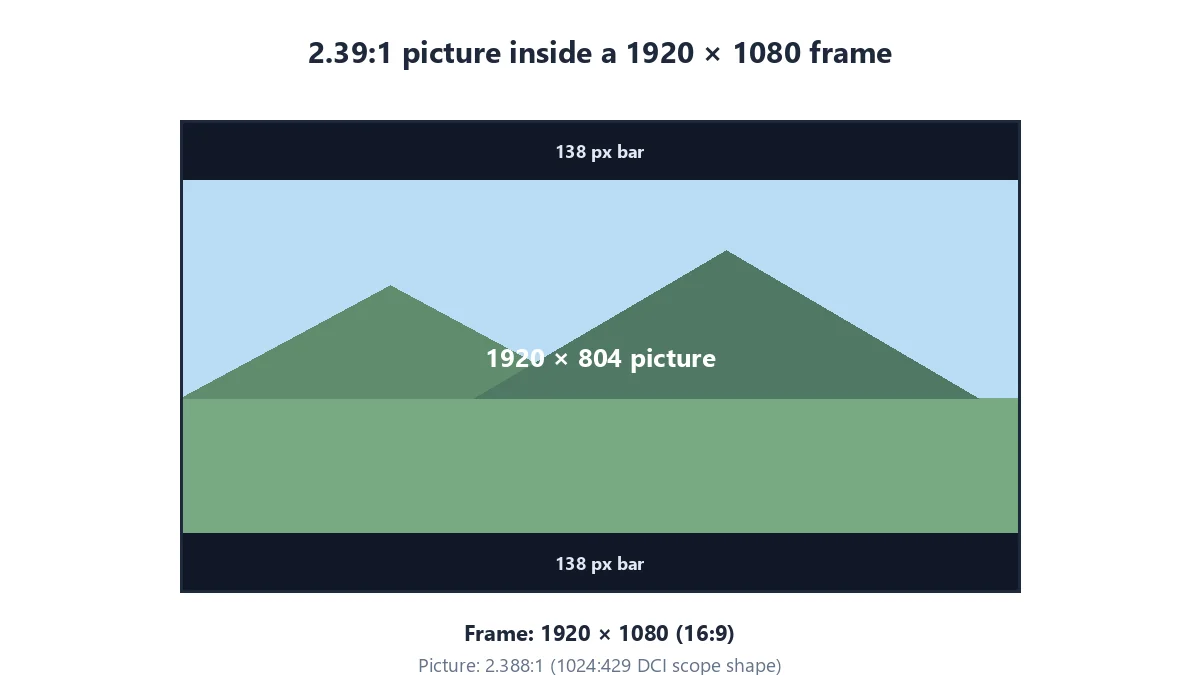
2.39:1 is the widescreen "scope" shape of modern cinema: the picture is 2.39 times as wide as it is tall. In a 1080p frame, that's a 1920 × 804 picture with a 138-pixel black bar at the top and bottom. Here's the bit most charts skip: the official cinema size, 4096 × 1716, actually works out to 2.387:1, not 2.39. Type a width or height below, pick your flavor of 2.39, and grab a letterbox overlay if you need one.
2.39:1 Calculator
Delivering to a cinema? Keep DCI scope. Matching a 3840 × 1600 file someone sent you? Pick 2.40. Results round to an even number.
2.387:1 · DCI 4K scope container
Calculated Ratio
2.39:1
2.387:1 (1024:429)
Enter your timeline size and pick a ratio. You get the picture between the bars, the height of each bar and a transparent PNG to download.
2.39:1 picture
1920 × 804
Bars: 138 px each, top and bottom (25.6% of the frame)
Transparent PNG with black bars. Put it on a track above your footage.
Pick the container your master or DCP lives in. You get the size of the picture and the bars around it.
2.39:1 picture
4096 × 1716
Bars: 222 px each, top and bottom (20.6% of the container)
Enter a width or a height and the other side updates. Switch to "Letterbox overlay" to download a transparent PNG with the bars already drawn at your frame size.
Picture inside 16:9
DCI cinema
2.40 versions
What is the 2.39:1 aspect ratio?
The 2.39:1 aspect ratio is the widescreen cinema frame known as "scope," where the picture is 2.39 times wider than it is tall [1]. It's one of the two shapes theatrical releases are delivered in. The other is 1.85:1, called "flat" [4].
There are two ways to get there. Shoot with anamorphic lenses, which squeeze a wide view onto the sensor and get stretched back out later. Or shoot with normal (spherical) lenses and crop the top and bottom. Both end up at 2.39 on screen [3].
In digital cinema, scope has two official sizes: 2048 × 858 for 2K and 4096 × 1716 for 4K [4]. Divide those out and you get 2.387, or 1024:429 if you like your fractions tidy. Everyone still calls it 2.39. That tiny gap is why you'll find three different "correct" 4K sizes online. I'll untangle them below.
Is it 2.35, 2.39 or 2.40?
It's the same family of frame. 2.35:1 is the older version, 2.39:1 replaced it in the early 1970s, and 2.40:1 is just 2.39 rounded up [1] [2].
Here's what happened. Film used to be physically cut and spliced, and in the old 2.35 frame those splices could flash on screen. In 1970 the industry's standards body, SMPTE, proposed a slightly shorter projection window to hide them, and the new standard came out as 2.39:1 [3]. People kept saying "2.35" out of habit for years, which is why the names still get mixed up [1].
| Label | Where you'll see it | Exact shape | Width at 1080 tall |
|---|---|---|---|
| 2.35:1 | CinemaScope films made before 1970, vintage looks | 2.350 | 2538 |
| 2.39:1 (cinema) | Cinema DCPs: 2048 × 858 and 4096 × 1716 | 2.387 (1024:429) | 2578 |
| 2.39:1 (literal) | Calculators that divide by 2.39 | 2.390 | 2582 |
| 2.40:1 | Spec sheets, and files sized 1920 × 800 or 3840 × 1600 | 2.400 (12:5) | 2592 |
Does the gap matter? On a phone, no. In a cinema, a 2.40 file in a 2.39 container leaves hairline bars. More on that in the cinema section.
For the classic CinemaScope look and its history, see the 2.35:1 calculator.
What are the 2.39:1 resolutions?
The 2.39:1 resolutions you'll use most are 1920 × 804 for HD, 3840 × 1608 for 4K UHD, and 2048 × 858 or 4096 × 1716 for cinema. Each one keeps the full width of its frame and gives up height.
| Size (pixels) | Exact ratio | Use it for |
|---|---|---|
| 1280 × 536 | 2.388 | 720p previews and proxies |
| 1920 × 804 | 2.388 | The picture inside a 1080p frame; HD masters |
| 1920 × 800 | 2.400 | Same job, 2.40 version |
| 2048 × 858 | 2.387 | 2K cinema DCP (scope) |
| 2560 × 1072 | 2.388 | The picture inside a 1440p frame |
| 3840 × 1608 | 2.388 | The picture inside a 4K UHD frame; UHD masters |
| 3840 × 1600 | 2.400 | Same job, 2.40 version |
| 4096 × 1716 | 2.387 | 4K cinema DCP (scope) |
| 7680 × 3218 | 2.387 | The picture inside an 8K frame |
Every size here is rounded to an even number, because most video encoders won't accept odd ones.
Should you use 3840 × 1600, 3840 × 1606 or 3840 × 1608?
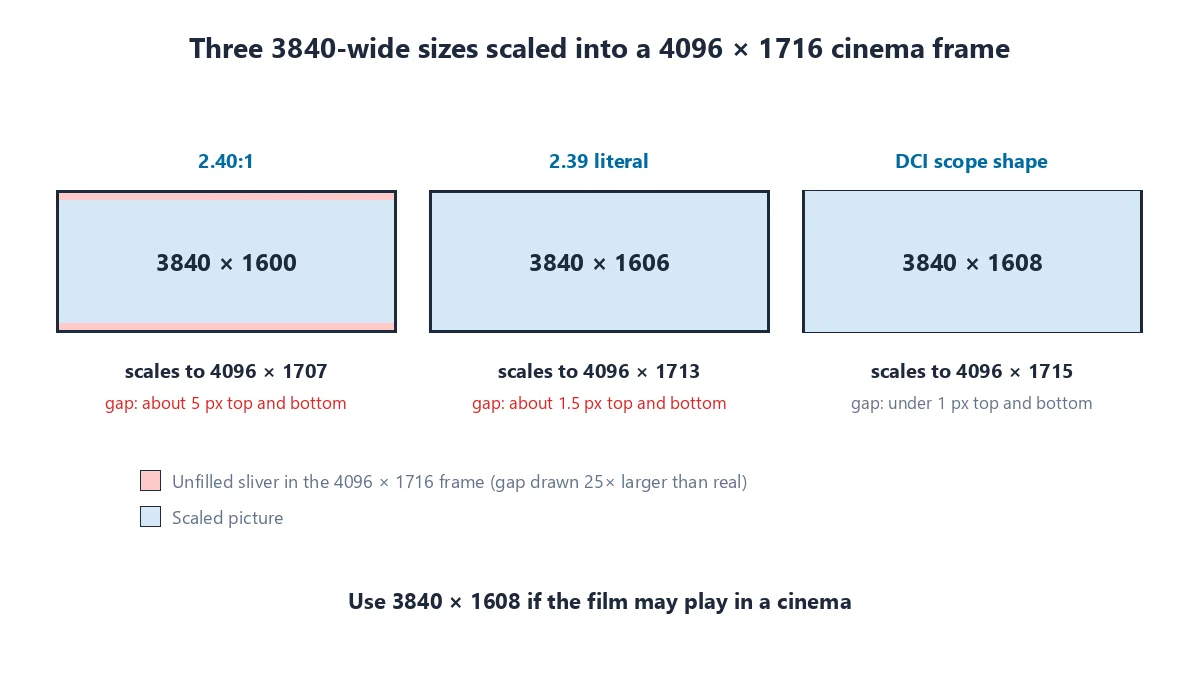
Use 3840 × 1608 if your film might ever play in a cinema, because it scales straight up to the 4096 × 1716 cinema size. 3840 × 1600 is 2.40:1 and is fine for web-only work. 3840 × 1606 is what you get from dividing by 2.39, and it leaves odd 277-pixel bars in a 4K frame.
Here's the difference in numbers. Scale 3840 × 1608 up to 4096 wide and it's 1715 pixels tall, less than a pixel short of the cinema frame. Scale 3840 × 1600 up and it's 1707 tall, leaving a sliver of about 5 pixels at the top and bottom. It's small, but on a big cinema screen a thin black line above and below the picture is easy to spot.
How do you add 2.39:1 letterbox bars to a 16:9 video?
To add 2.39:1 letterbox bars to a 16:9 video, cover the top and bottom of the frame with black until the picture between them is 2.39 times as wide as it is tall. On a 1920 × 1080 timeline, that's a 138-pixel bar at the top and another at the bottom. On 3840 × 2160, it's 276 pixels each.
| Frame | Picture | Each bar |
|---|---|---|
| 1280 × 720 | 1280 × 536 | 92 px |
| 1920 × 1080 | 1920 × 804 | 138 px |
| 2560 × 1440 | 2560 × 1072 | 184 px |
| 3840 × 2160 | 3840 × 1608 | 276 px |
| 1080 × 1920 (vertical) | 1080 × 452 | 734 px |
Here's how to add them:
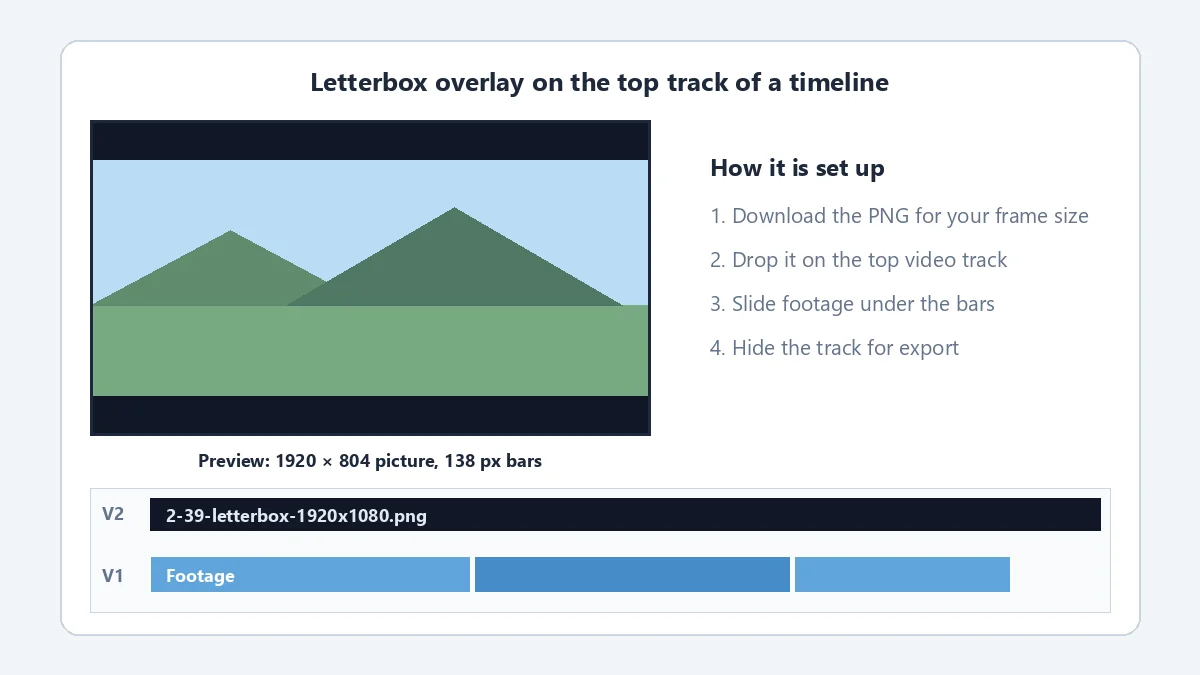
- Any editor: switch the calculator to "Letterbox overlay," type your frame size and download the PNG. Put it on the top track, above your footage. It works in Premiere Pro, DaVinci Resolve, Final Cut Pro and CapCut.
- Premiere Pro: add a Crop effect to an adjustment layer and set Top and Bottom to 12.8% each (138 ÷ 1080).
- DaVinci Resolve: open Timeline > Output Blanking and pick a 2.39 or 2.40 option from the list.
Then slide your footage up or down inside the bars. Let the bars take sky or floor, not foreheads. Keep titles and lower thirds inside the picture, too. If someone later cuts a bar-free 2.39 version for a cinema, anything sitting on the bars disappears.
One fun use: the vertical "cinematic strip." Put a 2.39 picture in the middle of a 1080 × 1920 Reel or Short and you get a 1080 × 452 band with 734-pixel bars, which leaves plenty of room for captions above and below. For the platform sizes themselves, see the 9:16 calculator.
Uploading to YouTube? Don't bake the bars in. Upload the bar-free 3840 × 1608 file and let the player add its own. The 21:9 calculator explains why.
How do you fit 2.39:1 into a DCP or UHD master?
To fit 2.39:1 into a cinema DCP, use the scope container: 2048 × 858 for 2K or 4096 × 1716 for 4K [4]. Your picture fills it edge to edge, with no bars. The cinema's screen masking does the rest.
Sometimes you'll need it inside a different container. Here's where the picture lands.
| Container | 2.39 picture | Each bar |
|---|---|---|
| DCI 4K full (4096 × 2160) | 4096 × 1716 | 222 px |
| DCI 4K flat (3996 × 2160) | 3996 × 1674 | 243 px |
| UHD (3840 × 2160) | 3840 × 1608 | 276 px |
| DCI 2K full (2048 × 1080) | 2048 × 858 | 111 px |
Flat vs scope: which should you pick?
Pick scope for a 2.39 film and flat for a 1.85 film. Flat fills the height of the cinema frame, and scope fills the width. Put a 2.39 film in a flat container and the cinema has to show it as a smaller, letterboxed picture.
Worked example: a festival short shot in 4K
Say you shot on a mirrorless camera at 3840 × 2160 and framed for 2.39.
- Edit on a 3840 × 2160 timeline with the overlay PNG on top, so you always see the final frame.
- Export your web master at 3840 × 1608, with no bars.
- For the festival DCP, scale that master to 4096 × 1716. It fills the 4K scope container to within a pixel.
- Need a 2K DCP as well? Scale to 2048 × 858.
For the taller IMAX-style container, see the 1.90:1 calculator. For the flat cinema frame, there's the 1.85:1 calculator.
How do you crop 16:9 footage to 2.39:1?
To crop 16:9 footage to 2.39:1, keep the full width and remove about 25.6% of the height, roughly 12.8% from the top and 12.8% from the bottom. A 1920 × 1080 clip becomes 1920 × 804. A 3840 × 2160 clip becomes 3840 × 1608.
- In camera: turn on 2.39 (or 2.35 or 2.40) frame guides if you have them, and keep heads out of the top band.
- Shoot a little loose: you'll want room to slide the crop later.
- Don't always center it: slide the frame so the crop takes sky or floor, and the shot feels composed instead of chopped.
- Going the other way, 2.39 to 16:9: you have to cut the sides, about a quarter of the width. Keep a 16:9 version ready for places that don't handle wide frames well.
Shooting anamorphic? With a 1.33x adapter on a 16:9 sensor, the stretched-out picture lands at about 2.36 to 2.37:1, a hair taller than scope. Trim less than 1% of the height to reach 2.39. For other squeeze factors (1.5x, 1.8x, 2x), use the anamorphic desqueeze calculator. For lens and sensor choices, there's the anamorphic calculator.
How does 2.39:1 compare with 1.85:1, 16:9 and 21:9?
2.39:1 is the widest of the everyday movie frames. At the same height, it's 34% wider than 16:9, 29% wider than 1.85:1 flat, and about 2% wider than 21:9.
| Ratio | Name | Width at 1080 tall | Where you'll see it |
|---|---|---|---|
| 16:9 (1.78:1) | HD / UHD | 1920 | TVs, YouTube, most cameras |
| 1.85:1 | Flat | 1998 | The other cinema container |
| 1.90:1 (exactly 1.896) | DCI full / IMAX Digital | 2048 | Full-container cinema releases |
| 2:1 | Univisium | 2160 | A middle ground some films and series use |
| 21:9 (2.33:1) | Ultrawide | 2520 | Ultrawide monitors, cinematic edits |
| 2.39:1 (exactly 2.387) | Scope | 2578 | Widescreen films |
| 2.76:1 | Ultra Panavision 70 | 2980 | A handful of epic films |
What that means on real screens:
- 2.39 film on a 16:9 TV: bars cover about a quarter of the screen, split top and bottom.
- 2.39 film on a 3440 × 1440 monitor: it fills it almost exactly, because that screen is 2.389:1. More on the 21:9 calculator.
- 2.39 vs 2:1: 2:1 keeps more headroom and shows smaller bars on a TV. See the 2:1 calculator.
For the even wider epic frame, there's the 2.76:1 calculator. For standard widescreen, the 16:9 calculator.
What else do people ask about 2.39:1?
What is a 2.39 aspect ratio equal to?
A 2.39 aspect ratio is equal to 2.39 units of width for every 1 unit of height. In whole numbers, the cinema version is 1024:429. It's almost the same shape as 12:5 (2.40) and a little wider than 21:9 (2.33).
What is 2.39:1 in pixels?
2.39:1 in pixels is 1920 × 804 at HD, 3840 × 1608 at 4K UHD, and 4096 × 1716 for a 4K cinema DCP. For any other width, divide by 2.39 and round to an even number.
Is 1920 × 800 2.39:1?
1920 × 800 is 2.40:1, which most people treat as 2.39:1. The cinema-matched size at 1920 wide is 1920 × 804. Use 804 if you're matching a cinema master, and 800 is fine for the web.
Why do 2.39:1 movies have black bars on my TV?
2.39:1 movies have black bars on a 16:9 TV because the film is wider than the screen. To show the whole picture, the TV leaves about a quarter of the screen empty, split between the top and bottom. Many TVs have a zoom mode that fills the screen by cutting off the sides.
Is CinemaScope still used today?
CinemaScope as a brand isn't used today, but its shape lives on. The modern version is 2.39:1, which is what people mean when they say "scope". For the original, see the 2.35:1 calculator. [1]
Why don't movies use 16:9?
Many movies don't use 16:9 because cinemas are set up for two standard shapes, 1.85:1 flat and 2.39:1 scope. Films made for theaters pick one of those, and TVs show them with bars. [4]
Does 2.39:1 look more cinematic?
To most people, yes, because it's the shape audiences link with big-screen films. It's a framing choice, though, not a magic filter. A wide frame shows more of the location and less headroom, so it suits landscapes and groups better than talking heads.
References
- Wikipedia: Anamorphic format: https://en.wikipedia.org/wiki/Anamorphic_format
- Wikipedia: List of anamorphic format trade names: https://en.wikipedia.org/wiki/List_of_anamorphic_format_trade_names
- Film and Digital Times: Anamorphic Desqueeze (April 2018): https://www.fdtimes.com/wp-content/uploads/2018/04/87FDTimes-Anamorphic-Desqueeze-April2018-300.pdf
- ARRI: Recording Formats for Cinematic Release: https://www.arri.com/resource/blob/186774/5e07ee81fb8d22a5fed6ea0f6767ced9/recording-formats-for-cinematic-release-data.pdf
Related Aspect Ratio Calculators
Explore our other dedicated calculators for specific aspect ratios:
Aspect Ratio Visualizer
Overlay or compare two ratios side by side
Screen Hub
iPhone, monitor, and web ratio calculators
iPhone Calculator
iPhone display and media ratio reference
Monitor Calculator
16:9, 21:9, and 32:9 resolution converter
Web Design Calculator
OG, hero banner, and card ratio planning
Print Hub
Paper, poster, card, and cover ratio tools
Paper Sizes Calculator
A4, A3, Letter, Legal, and Tabloid ratios
Poster Calculator
ISO and US poster dimension converter
Business Card Calculator
Regional card ratio and bleed planning
Banner Calculator
Web and social cover ratio conversions
Book Cover Calculator
Print, ebook, and audiobook cover sizes
Photography Hub
Camera, film, and print ratio calculators
3:2 Photography Calculator
DSLR and 35mm ratio conversion tool
4:3 Photography Calculator
Micro Four Thirds and digital ratio tool
Medium Format Calculator
6x6, 6x7, and 6x4.5 ratio workflows
Photo Print Sizes Calculator
4x6, 5x7, 8x10 and crop planning
Social Media Hub
Platform ratio guides and calculators
YouTube Social Calculator
Thumbnails, Shorts, and channel image sizes
Instagram Social Calculator
Feed, Stories, and Reels dimensions
TikTok Social Calculator
Vertical-first TikTok video and image sizes
LinkedIn Social Calculator
Post, banner, and profile dimension tool
1.375:1 Calculator
Academy ratio aspect calculator
1.43:1 Calculator
IMAX aspect ratio calculator
1.85:1 Calculator
Theatrical cinema flat format
1.90:1 Calculator
IMAX Digital DCI format
2:1 Calculator
Univisium and 18:9 video format
2.35:1 Calculator
Classic CinemaScope anamorphic
2.76:1 Calculator
Ultra Panavision epic cinema format
Anamorphic Calculator
Widescreen scope dimensions (2.39:1, 2.35:1)
Anamorphic Desqueeze Calculator
Desqueeze 1.33x, 1.5x and 2x lens footage
16:9 Calculator
Standard HD and 4K format
1:1 Calculator
Square social feed video format
9:16 Calculator
Vertical Shorts and Reels format
21:9 Calculator
Ultra-wide display format
32:9 Calculator
Super ultra-wide format
4:3 Calculator
Classic TV and vintage format
4:5 Calculator
Instagram portrait format