4:3 Aspect Ratio Calculator for Video
Last updated:
A 4:3 aspect ratio (also written 4x3, 4 by 3 or 1.33:1) means the frame is 4 units wide for every 3 units tall, so 640 × 480, 1024 × 768 and 1440 × 1080 are all 4:3. As a fraction, 4/3 is 1.333. Type a width or height below to get the matching 4:3 size, then use the tables for SD video, pillarbox sizes and the 4:3 resolution list. Ratio is the shape and resolution is the pixel count, as aspect ratio vs resolution explains. For camera and print sizes, use the 4:3 photography calculator.
4:3 Calculator
Enter a width or a height and the other side updates at 4:3. H.264 and most editors want even sizes, so leave the switch on for video.
Common business and education baseline
Result
1024 × 768
4:3 (1.333)
786,432 pixels
1,280 px diagonal
Pick the frame your timeline or screen uses. The result is the 4:3 picture at full frame height and the bar on each side.
4:3 picture in a 1920 × 1080 frame
1440 × 1080
Bars: 240 px each, left and right (25.0% of the frame)
Enter a width or a height and the other side updates. Use Fit in a 16:9 frame to see the 4:3 picture size and the bars for 720p, 1080p, 1440p and 4K.
| Name | Size | Pixels | Note |
|---|---|---|---|
| VGA / SD | 640 × 480 | 307,200 | 480p at 4:3 |
| XGA | 1024 × 768 | 786,432 | Projector and display size |
| 1080p height | 1440 × 1080 | 1,555,200 | Largest 4:3 picture in a 1080p frame |
| 1440p height | 1920 × 1440 | 2,764,800 | Largest 4:3 picture in a 1440p frame |
| 4K height | 2880 × 2160 | 6,220,800 | Largest 4:3 picture in a 4K UHD frame |
What are the standard 4:3 resolutions?
The standard 4:3 resolutions run from 640 × 480 for standard definition to 2880 × 2160 at 4K height, with 1024 × 768 and 1440 × 1080 in between. Pick the row that matches the frame you're delivering into. The same list covers the 4x3 resolutions people look up by p-number, from 144p to 2160p.
| Name | Size | Pixels | Diagonal (px) | Use |
|---|---|---|---|---|
| 144p | 192 × 144 | 27,648 | 240 | Smallest size on the ladder |
| 240p | 320 × 240 | 76,800 | 400 | QVGA, early web and mobile video |
| 360p | 480 × 360 | 172,800 | 600 | Low-bandwidth web video |
| 480p | 640 × 480 | 307,200 | 800 | VGA and 4:3 standard definition |
| 576p | 768 × 576 | 442,368 | 960 | PAL SD on a square-pixel canvas |
| SVGA | 800 × 600 | 480,000 | 1,000 | Classic desktop and projector size |
| 720p | 960 × 720 | 691,200 | 1,200 | 4:3 at 720 tall |
| XGA | 1024 × 768 | 786,432 | 1,280 | Business and education baseline |
| SXGA | 1280 × 960 | 1,228,800 | 1,600 | Super XGA |
| 1080p | 1440 × 1080 | 1,555,200 | 1,800 | Full height of a 1080p frame |
| 1152 | 1536 × 1152 | 1,769,472 | 1,920 | Common in 4:3 size lists |
| UXGA | 1600 × 1200 | 1,920,000 | 2,000 | Ultra XGA |
| 1440p | 1920 × 1440 | 2,764,800 | 2,400 | Full height of a 1440p frame |
| QXGA | 2048 × 1536 | 3,145,728 | 2,560 | Quad XGA |
| 2160p | 2880 × 2160 | 6,220,800 | 3,600 | Full height of a 4K UHD frame |
Why is the diagonal always 1.25 times the width?
A 4:3 frame is a 3-4-5 right triangle, so the diagonal is 5 units when the width is 4. That makes the diagonal 1.25 times the width. 640 × 480 has an 800-pixel diagonal and 1440 × 1080 has 1800.
What is 4:3 in pixels?
4:3 in pixels is any width and height where the width is four thirds of the height. Multiply the height by 4 and divide by 3 to get the width, or multiply the width by 3 and divide by 4 to get the height. Then round to an even number, so your editing software doesn't complain.
Width = height × 4 ÷ 3
Height = width × 3 ÷ 4
The calculator multiplies before it divides, so nothing is lost to rounding until the last step.
Here are four worked examples:
- Height 1080: 1080 × 4 ÷ 3 = 1440, so the frame is 1440 × 1080. No rounding needed.
- Width 1024: 1024 × 3 ÷ 4 = 768, so the frame is 1024 × 768.
- Width 1500: 1500 × 3 ÷ 4 = 1125. That's odd, so video uses 1126 (1124 is just as close).
- Height 500: 500 × 4 ÷ 3 = 666.67. The nearest even number is 666, so the frame is 666 × 500.
| Width | Exact height | Size to use | Note |
|---|---|---|---|
| 320 | 240 | 320 × 240 | Even, use as is |
| 400 | 300 | 400 × 300 | Even, use as is |
| 500 | 375 | 500 × 376 | Odd, so video uses the even size |
| 640 | 480 | 640 × 480 | Even, use as is |
| 720 | 540 | 720 × 540 | Even, use as is |
| 800 | 600 | 800 × 600 | Even, use as is |
| 1000 | 750 | 1000 × 750 | Even, use as is |
| 1024 | 768 | 1024 × 768 | Even, use as is |
| 1200 | 900 | 1200 × 900 | Even, use as is |
| 1280 | 960 | 1280 × 960 | Even, use as is |
| 1440 | 1080 | 1440 × 1080 | Even, use as is |
| 1500 | 1125 | 1500 × 1126 | Odd, so video uses the even size |
| 1600 | 1200 | 1600 × 1200 | Even, use as is |
| 1920 | 1440 | 1920 × 1440 | Even, use as is |
| 2048 | 1536 | 2048 × 1536 | Even, use as is |
| 2560 | 1920 | 2560 × 1920 | Even, use as is |
| 3000 | 2250 | 3000 × 2250 | Even, use as is |
| 3840 | 2880 | 3840 × 2880 | Even, use as is |
To check a size you already have, divide width by height. 1440 ÷ 1080 = 1.333, so it's 4:3. 720 × 480 gives 1.5, which is 3:2.
What is 480p in 4:3, and how big is SD video?
480p in 4:3 is 640 × 480. The 16:9 version of 480p is 854 × 480, so the 480 only describes the height [1]. Broadcast TV was 4:3 until widescreen took over, so archive tapes and DVDs of older shows are standard definition at 4:3, and that is the old TV shape.
| Standard | Stored frame | Square-pixel 4:3 | Pixel aspect ratio |
|---|---|---|---|
| NTSC | 720 × 480 | 640 × 480 | About 0.9 |
| PAL | 720 × 576 | 768 × 576 | About 1.1 |
On paper neither stored frame is 4:3, because 720 × 480 divides to 1.5 and 720 × 576 to 1.25. The pixels are not square, and editors correct for that with a pixel aspect ratio [2]. Use the square-pixel column when you need a canvas for the web or for a project with square pixels.
Where is 4:3 still used?
4:3 is still used wherever old material or old hardware is involved. These are the cases you're most likely to meet:
- Archive footage: Older broadcasts, home video and DVDs are 4:3 and are often kept that way for restoration.
- Projectors and presentation screens: 1024 × 768 (XGA) is still a common size.
- Legacy capture and camera feeds: Some capture cards and security cameras output 640 × 480 or 1024 × 768.
- Deliberate period looks: Editors choose 4:3 to match old material or to give a modern project a retro feel.
For panel sizes and diagonals on actual displays, use the monitor calculator.
What size is 4:3 inside a 1080p or 4K timeline?
A 4:3 picture in a 1080p timeline is 1440 × 1080, with a 240-pixel bar on the left and right. In a 4K UHD timeline it's 2880 × 2160, with 480-pixel bars. Bars at the sides of a picture are called pillarboxes.
| 16:9 frame | 4:3 picture | Bar on each side |
|---|---|---|
| 1280 × 720 | 960 × 720 | 160 px each side |
| 1920 × 1080 | 1440 × 1080 | 240 px each side |
| 2560 × 1440 | 1920 × 1440 | 320 px each side |
| 3840 × 2160 | 2880 × 2160 | 480 px each side |
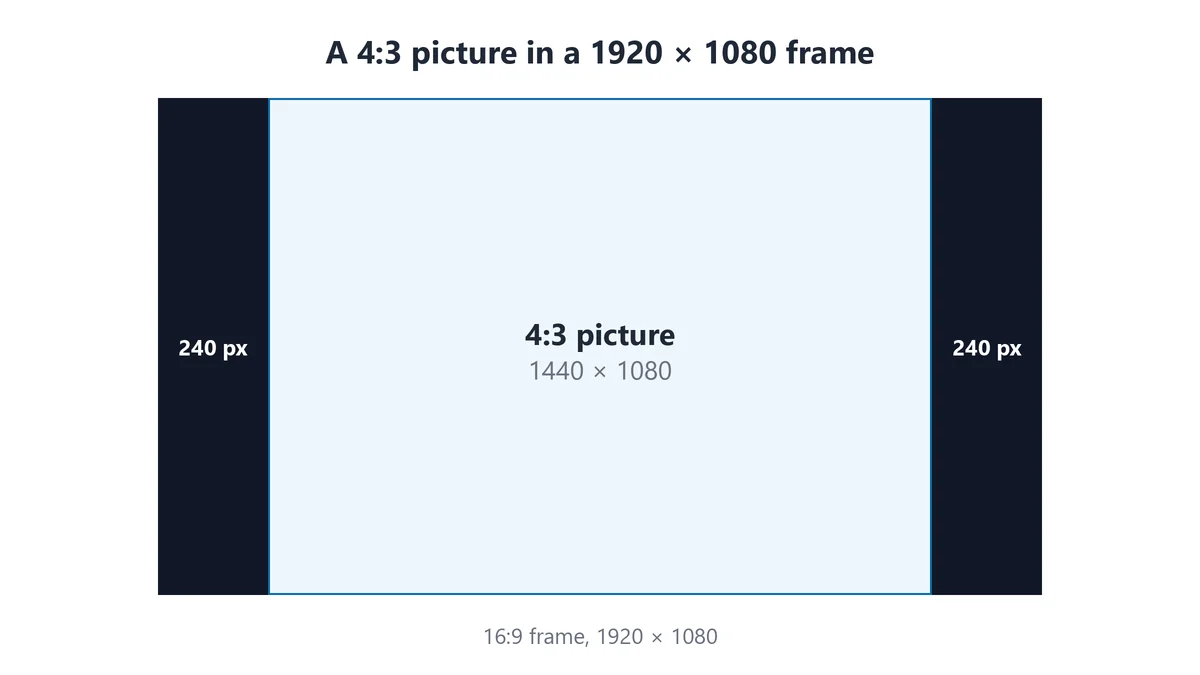
The picture always takes 75% of the frame width, so the bars are 12.5% of the width on each side. You can also fill the frame by cropping: a 4:3 clip cropped to 16:9 keeps the full width and loses 25% of the height. Pillarbox when you can't lose picture. For other 16:9 sizes, use the 16:9 calculator.
What is the 1440 × 1080 aspect ratio?
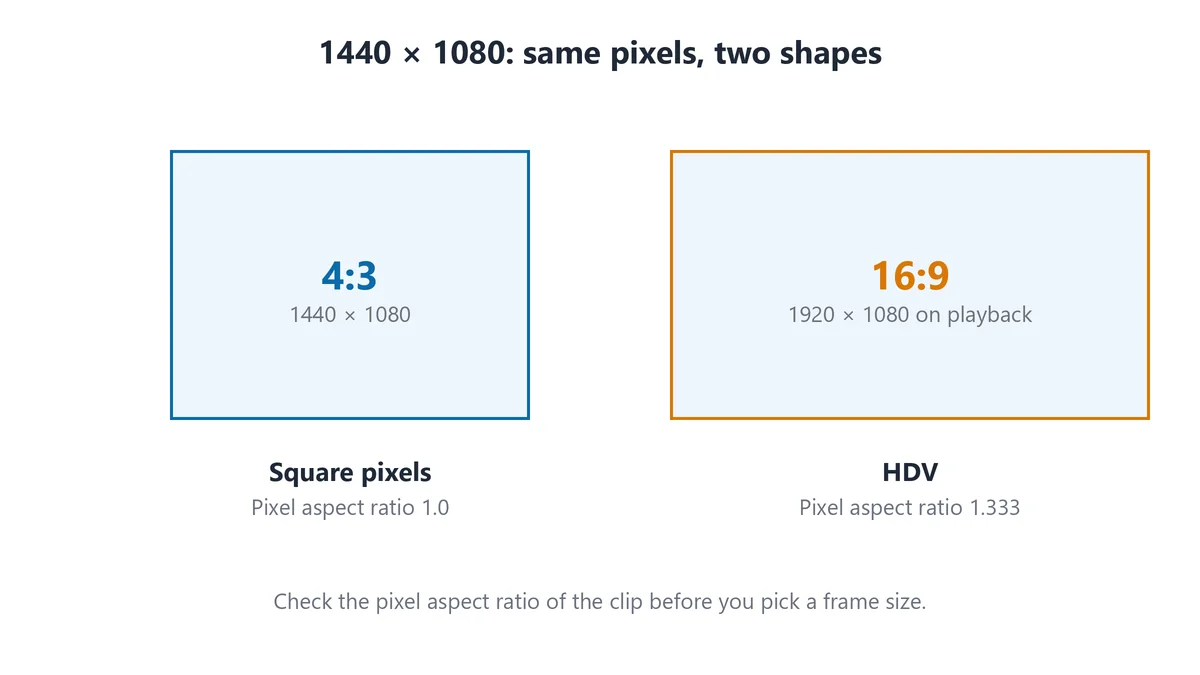
1440 × 1080 is a 4:3 aspect ratio when the pixels are square, but HDV video of the same size plays back as 16:9. HDV camcorders record 1440 × 1080 with pixels 1.333 times wider than they are tall, so the picture stretches to 1920 × 1080 on playback [3].
The numbers are the same and the shapes are different. Check the pixel aspect ratio of the clip in your editor: Square Pixels means 4:3 and 1.333 means 16:9. The anamorphic desqueeze calculator handles the stretch maths for other squeeze factors.
What is the difference between 4:3 and the 1.37:1 Academy ratio?
The 1.37:1 Academy ratio is about 3% wider than 4:3, so a 1.375:1 frame at 1080 tall is 1485 wide against 1440 [4]. The two are easy to mix up because film frames of that era were close to 4:3, which is why classic movies nearly fill an old TV screen.
| Shape | Width at 1080 tall | Width at 2160 tall |
|---|---|---|
| 4:3 (1.333) | 1440 | 2880 |
| 1.375:1 (11:8) | 1485 | 2970 |
Archive scans are labelled 4:3 or 1.37:1 depending on who made them. For film-scan sizes, use the 1.375:1 Academy ratio calculator.
How does 4:3 compare with 16:9?
16:9 is the better choice for almost all modern video, and 4:3 is the better choice for archive and legacy work. At the same height, 16:9 is 33% wider, which is 1920 against 1440 at 1080 tall. A 16:9 picture on a 4:3 screen does the reverse and leaves bars above and below, so a 1440-wide screen shows it at 1440 × 810.
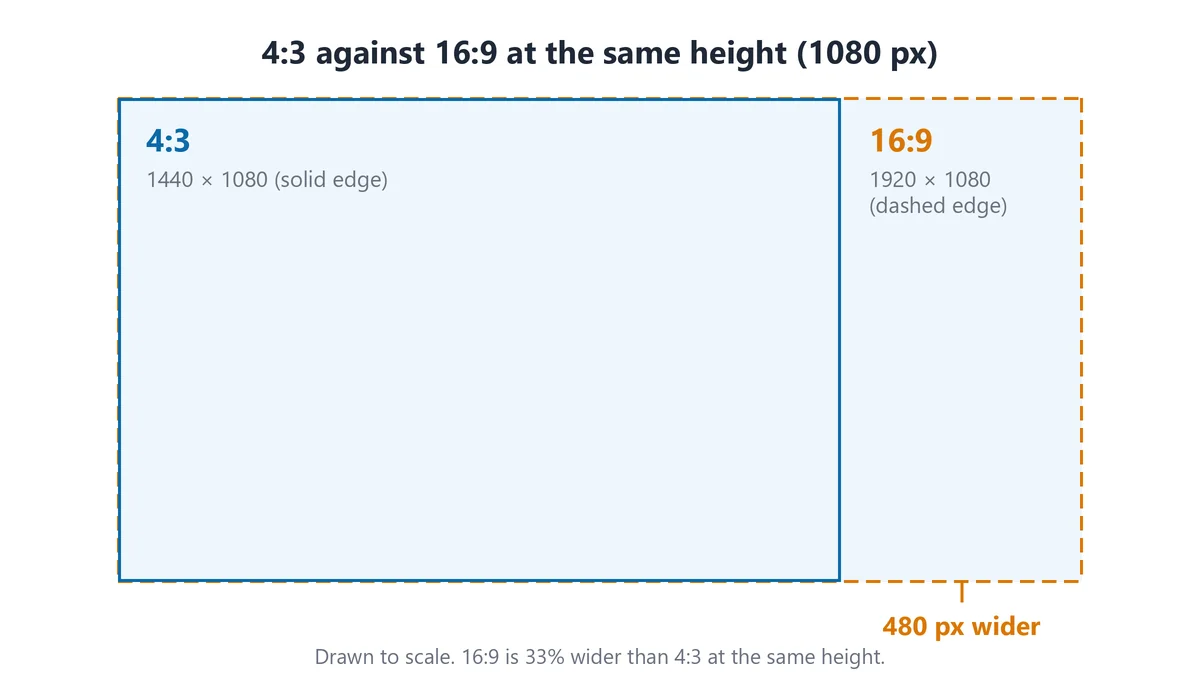
The full verdict is in 16:9 versus 4:3, which is better, and you can lay the two shapes over each other in the aspect ratio visualizer. 4:3 is also close to 3:2, which is 12.5% wider (1620 against 1440 at 1080 tall). For photo sizes in 3:2, use the 3:2 photography calculator.
What are the 3:4 sizes?
3:4 is 4:3 turned on its side, so the width and height swap. Multiply the width by 4 and divide by 3 to get the height.
| Name | 3:4 size | 4:3 size |
|---|---|---|
| VGA / SD | 480 × 640 | 640 × 480 |
| PAL square pixel | 576 × 768 | 768 × 576 |
| XGA | 768 × 1024 | 1024 × 768 |
| 1080p height | 1080 × 1440 | 1440 × 1080 |
| QXGA | 1536 × 2048 | 2048 × 1536 |
| 4K height | 2160 × 2880 | 2880 × 2160 |
What else do people ask about 4:3?
What size is a 4:3 aspect ratio?
4:3 has no single size, because it's a shape and not a resolution. The common sizes are 640 × 480, 1024 × 768, 1440 × 1080 and 2880 × 2160. Any width and height that divide to 1.333 are 4:3.
What does 4 by 3 mean?
4 by 3 means the picture is 4 units wide for every 3 units tall. It's the same as 4:3, 4x3 and 1.33:1, and as a fraction 4/3 is 1.333. A 4 by 3 frame 1200 pixels wide is 900 pixels tall.
What is 480p in 4:3?
480p in 4:3 is 640 × 480. The 16:9 version of 480p is 854 × 480, so the 480 only tells you the height. PAL standard definition is 768 × 576 at 4:3 on a square-pixel canvas.
What is 4:3 in 1080p?
4:3 in 1080p is 1440 × 1080. Inside a 1920 × 1080 frame it leaves a 240-pixel bar on the left and right. It's the largest 4:3 picture that fits a 1080p frame.
What is 4:3 in 4K?
4:3 in 4K is 2880 × 2160 if it keeps the full 4K UHD height. Inside a 3840 × 2160 frame it leaves a 480-pixel bar on each side. If you need a 4:3 frame 3840 pixels wide, that is 3840 × 2880, which is taller than a UHD screen.
Is 1440 × 1080 a 4:3 aspect ratio?
Yes, 1440 × 1080 is 4:3 when the pixels are square. HDV camcorders also record 1440 × 1080, but they flag the pixels as 1.333 times wider than they are tall, so the picture plays back as 16:9 at 1920 × 1080. Check the pixel aspect ratio in your editor before you decide which one you have. The anamorphic desqueeze calculator covers the stretch maths.
How do I find the height for a 4:3 width?
To find the height for a 4:3 width, multiply the width by 3 and divide by 4. A width of 1500 gives 1125, which is odd, so video editors want 1126 or 1124. The calculator rounds to an even number by default and shows the exact answer underneath.
Is 4:3 the same as 1.33:1 and 1.37:1?
4:3 is the same as 1.33:1, but 1.37:1 is a different shape. The 1.37:1 Academy ratio (also written 1.375:1 or 11:8) is about 3% wider, which is 1485 × 1080 against 1440 × 1080. The 1.375:1 calculator has the film sizes.
How do I set up a 4:3 sequence in Premiere Pro?
To set up a 4:3 sequence in Premiere Pro, open Sequence Settings, set Editing Mode to Custom, enter a frame size such as 1440 × 1080 and set the pixel aspect ratio to Square Pixels. Keep the width and height at 4:3 and both even. The 4:3 clip then sits inside a 16:9 export with bars on each side.
What are the 4:3 sizes for photos and prints?
Photo and print sizes use the same 4:3 shape but have their own sizes, such as 4000 × 3000 from a camera sensor. Those are on the 4:3 photography calculator, which covers cameras and print sizes. This page sticks to video and display sizes.
References
- Wikipedia: 480p: https://en.wikipedia.org/wiki/480p
- Wikipedia: Pixel aspect ratio: https://en.wikipedia.org/wiki/Pixel_aspect_ratio
- Wikipedia: HDV: https://en.wikipedia.org/wiki/HDV
- Wikipedia: Academy ratio: https://en.wikipedia.org/wiki/Academy_ratio
Related Aspect Ratio Calculators
Explore our other dedicated calculators for specific aspect ratios:
Aspect Ratio Visualizer
Overlay or compare two ratios side by side
Screen Hub
iPhone, monitor, and web ratio calculators
iPhone Calculator
iPhone display and media ratio reference
Monitor Calculator
16:9, 21:9, and 32:9 resolution converter
Web Design Calculator
OG, hero banner, and card ratio planning
Print Hub
Paper, poster, card, and cover ratio tools
Paper Sizes Calculator
A4, A3, Letter, Legal, and Tabloid ratios
Poster Calculator
ISO and US poster dimension converter
Business Card Calculator
Regional card ratio and bleed planning
Banner Calculator
Web and social cover ratio conversions
Book Cover Calculator
Print, ebook, and audiobook cover sizes
Photography Hub
Camera, film, and print ratio calculators
3:2 Photography Calculator
DSLR and 35mm ratio conversion tool
4:3 Photography Calculator
Micro Four Thirds and digital ratio tool
Medium Format Calculator
6x6, 6x7, and 6x4.5 ratio workflows
Photo Print Sizes Calculator
4x6, 5x7, 8x10 and crop planning
Social Media Hub
Platform ratio guides and calculators
YouTube Social Calculator
Thumbnails, Shorts, and channel image sizes
Instagram Social Calculator
Feed, Stories, and Reels dimensions
TikTok Social Calculator
Vertical-first TikTok video and image sizes
LinkedIn Social Calculator
Post, banner, and profile dimension tool
1.375:1 Calculator
Academy ratio aspect calculator
1.43:1 Calculator
IMAX aspect ratio calculator
1.85:1 Calculator
Theatrical cinema flat format
1.90:1 Calculator
IMAX Digital DCI format
2:1 Calculator
Univisium and 18:9 video format
2.35:1 Calculator
Classic CinemaScope anamorphic
2.39:1 Calculator
Modern anamorphic scope format
2.76:1 Calculator
Ultra Panavision epic cinema format
Anamorphic Calculator
Widescreen scope dimensions (2.39:1, 2.35:1)
Anamorphic Desqueeze Calculator
Desqueeze 1.33x, 1.5x and 2x lens footage
16:9 Calculator
Standard HD and 4K format
1:1 Calculator
Square social feed video format
9:16 Calculator
Vertical Shorts and Reels format
21:9 Calculator
Ultra-wide display format
32:9 Calculator
Super ultra-wide format
4:5 Calculator
Instagram portrait format