16:9 Aspect Ratio Calculator
Last updated:
16:9 is the widescreen shape of almost every TV, monitor, laptop and YouTube video. It means 16 units wide for every 9 units tall, and the standard 16:9 size is 1920 × 1080 pixels. Type a width or height below and this calculator finds the other side, rounded to a whole pixel.
16:9 Calculator
Enter a width or a height and the other value updates. To check whether a size is a true 16:9, use the Check my size tab.
The everyday 16:9 standard
Calculated Ratio
16:9
Fill in both to check whether a size is a true 16:9.
Enter a whole-number width and height to see the verdict.
What is the 16:9 aspect ratio?
The 16:9 aspect ratio is a widescreen shape that is 16 units wide and 9 units tall. Divide 16 by 9 and you get 1.7778, which is why film and TV people often write it as 1.78:1. The shape is the same whether it's a phone turned sideways or an 85-inch TV.
You'll see it written a few ways: 16:9, 16x9, 16 by 9 and "sixteen-nine." They all mean the same thing.
The shape wasn't an accident. Engineer Kerns H. Powers proposed it in 1984 as a middle ground between old 4:3 TV and wide cinema formats, so both could be shown with only small black bars [4]. Since then it has become the default for HD and 4K TV, computer monitors and online video.
Working in portrait? 9:16 is the same shape turned on its side, and the 9:16 aspect ratio calculator handles vertical sizes.
What are the standard 16:9 resolutions?
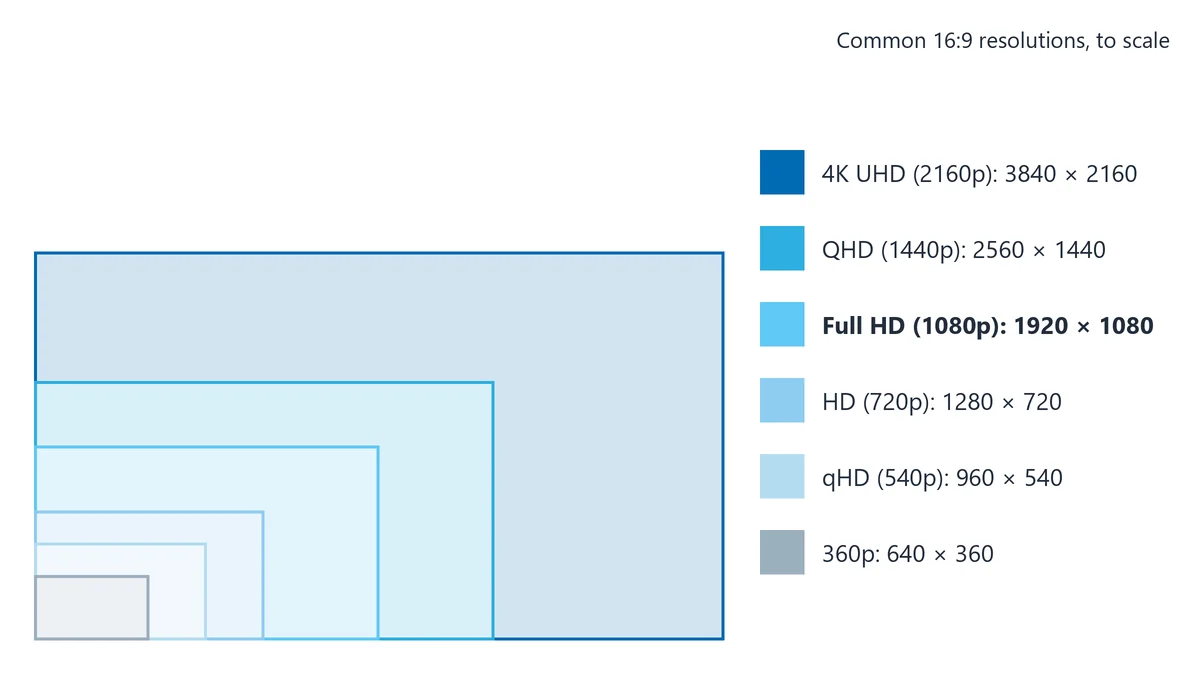
The standard 16:9 resolutions run from 426 × 240 up to 7680 × 4320 (8K). YouTube lists eight of these sizes, from 240p to 8K, as its recommended 16:9 upload resolutions [1], and you'll find the same sizes on TVs, monitors and in editing software.
| Name | 16:9 resolution (pixels) | Total pixels | Where you'll see it |
|---|---|---|---|
| 240p | 426 × 240 | 0.10 MP | Tiny previews (near 16:9) |
| 360p | 640 × 360 | 0.23 MP | Low-data playback |
| 480p (SD) | 854 × 480 | 0.41 MP | Standard-definition web video (near 16:9) |
| 540p (qHD) | 960 × 540 | 0.52 MP | Proxy edits, older phones |
| 720p (HD) | 1280 × 720 | 0.92 MP | Lighter uploads, HD streaming |
| 900p (HD+) | 1600 × 900 | 1.44 MP | Budget laptops and monitors |
| 1080p (Full HD) | 1920 × 1080 | 2.07 MP | The everyday standard for video, TVs and monitors |
| 1440p (QHD) | 2560 × 1440 | 3.69 MP | Gaming and design monitors |
| 2160p (4K UHD) | 3840 × 2160 | 8.29 MP | 4K TVs, streaming, camera masters |
| 4320p (8K UHD) | 7680 × 4320 | 33.18 MP | 8K TVs and high-end capture |
Each step up costs more than you might think. 4K holds exactly four times the pixels of 1080p, and 8K holds four times the pixels of 4K, so file sizes and upload times climb fast.
One thing worth knowing: since 2022, YouTube has been removing playback support for sizes between 4K and 8K, such as 5K [1]. If you edit in 5K or 6K, export a 3840 × 2160 copy for upload. Our guide to aspect ratio vs resolution explains why shape and pixel count are two separate settings.
Is 1920x1080 a 16:9 ratio?
Yes, 1920x1080 is exactly a 16:9 ratio. Divide both numbers by their greatest common divisor, 120, and you get 16 and 9. It's called Full HD or 1080p, and it's the most common 16:9 resolution in use.
Is 2560x1440 a 16:9 resolution?
Yes, 2560x1440 is a 16:9 resolution. Divide both sides by 160 and you get 16 and 9. It's usually called QHD or 1440p. YouTube labels it "2k" [1], which trips people up, because cinema 2K is a different size.
Is 1280x720 a 16:9 aspect ratio?
Yes, 1280x720 is a 16:9 aspect ratio. Divide both numbers by 80 and you get 16 and 9. It's HD or 720p, and it's also a common size for YouTube thumbnails, which YouTube asks to be 16:9 and at least 640 pixels wide [2].
What is the 16:9 4K resolution?
The 16:9 4K resolution is 3840 × 2160, also called 4K UHD or 2160p. It's the size 4K TVs use, and the 4K size YouTube asks for [1].
Cinema 4K is wider. The DCI standard is 4096 × 2160, which works out to about 1.90:1, not 16:9. If a brief asks for "4K" for a cinema or festival delivery, use the 1.90:1 calculator instead.
What 16:9 resolutions are lower than 720p?
The 16:9 resolutions lower than 720p are 960 × 540, 854 × 480, 640 × 360, 426 × 240 and 256 × 144. They're handy for proxy files, previews and video on slow connections. Two of them, 854 × 480 and 426 × 240, are rounded to whole numbers, so they're a fraction of a pixel off true 16:9.
Which resolutions look 16:9 but aren't?
Some very common screen sizes are sold as 16:9 but aren't a perfect match. The best-known is 1366 × 768, a laptop size. A true 16:9 frame that's 768 pixels tall would be 1365.33 pixels wide, and you can't have a third of a pixel, so it was rounded up. The shape is off by about 0.05%, which nobody will ever see.
Other sizes look close but are a different ratio entirely. 1920 × 1200 and 1440 × 900 are 16:10, which is taller. Here's how to tell them apart:
| Resolution | Width ÷ height | Verdict |
|---|---|---|
| 1920 × 1080 | 1.778 | True 16:9 |
| 1600 × 900 | 1.778 | True 16:9 |
| 1360 × 765 | 1.778 | True 16:9 (rare) |
| 1366 × 768 | 1.779 | Near 16:9 (rounded) |
| 854 × 480 | 1.779 | Near 16:9 (rounded) |
| 1920 × 1200 | 1.600 | 16:10, not 16:9 |
| 1440 × 900 | 1.600 | 16:10, not 16:9 |
| 2560 × 1080 | 2.370 | 21:9 ultrawide, not 16:9 |
The rule is simple. A size is true 16:9 only when the width is 16 times some whole number and the height is 9 times the same number. 1920 is 16 × 120, and 1080 is 9 × 120, so it passes.
Why does it matter for video? A 1920 × 1080 video plays on a 1366 × 768 laptop without bars, because the shapes match to within a pixel. But a 16:10 screen shows your 16:9 video with thin bars above and below, so keep titles and lower thirds away from the very edges of the frame.
To check any size, type both numbers into the calculator above. Or divide the width by the height: if you get 1.777 or 1.778, it's 16:9.
How do you calculate 16:9 dimensions?
To calculate 16:9 dimensions, multiply the width by 9 and divide by 16 to get the height. To find the width, multiply the height by 16 and divide by 9. The 16:9 calculator at the top of this page does the sum for you.
Height = width × 9 ÷ 16
Width = height × 16 ÷ 9
16:9 as a decimal = 16 ÷ 9 = 1.7778, so the height is always 56.25% of the width
Here are four worked examples:
- Website hero image, width 1200: 1200 × 9 ÷ 16 = 675, so the size is 1200 × 675.
- Monitor with a height of 1440: 1440 × 16 ÷ 9 = 2560, so the size is 2560 × 1440.
- Blog video embed, width 800: 800 × 9 ÷ 16 = 450, so the size is 800 × 450.
- Width 1000: 1000 × 9 ÷ 16 = 562.5. Round to 563, so the size is 1000 × 563.
The last one shows the catch. You only get a clean, whole-number height when the width divides evenly by 16. Widths like 640, 1024, 1280, 1600 and 1920 always work, so if you get to choose, pick one of those.
How do you keep a 16:9 video embed in shape on a website?
To keep a 16:9 video embed in shape, set the CSS aspect-ratio property to 16 / 9 on the video or its wrapper. The box then keeps the right height at any width, from a phone to a wide monitor:
.video-wrap { width: 100%; aspect-ratio: 16 / 9; }Older sites do the same job with a wrapper set to padding-top: 56.25%, which is 9 ÷ 16 written as a percentage.
What size is a 16:9 screen in inches?
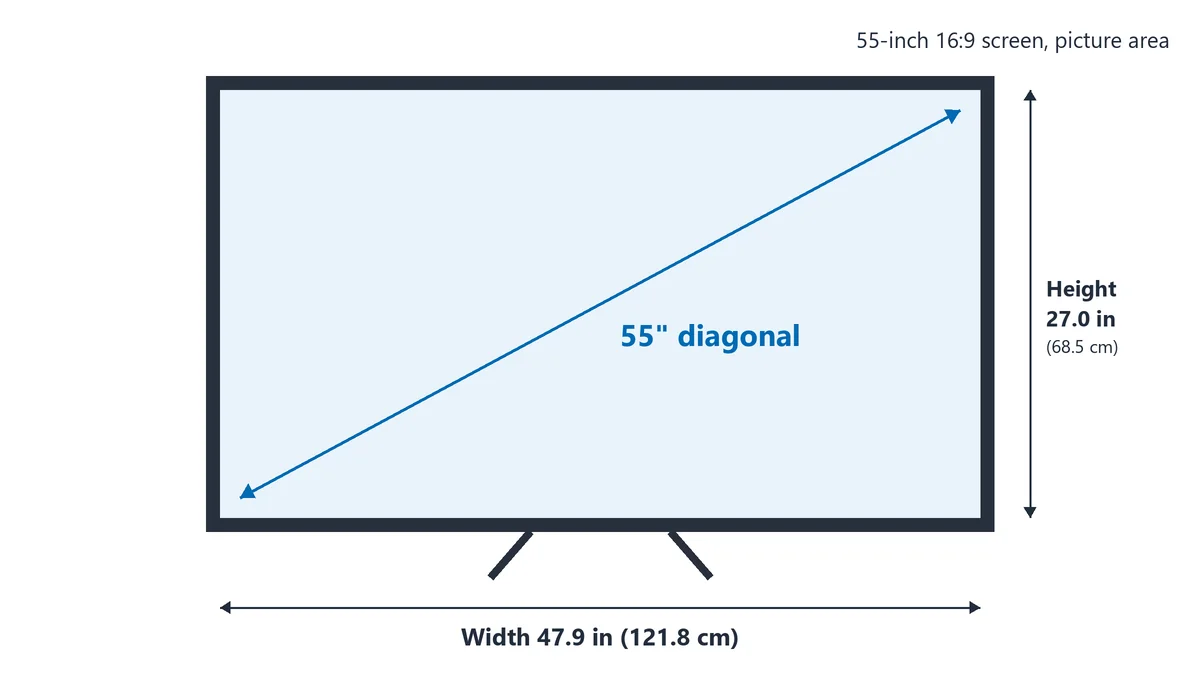
A 16:9 screen is about 0.872 times its diagonal wide and 0.490 times its diagonal tall. So a 55-inch 16:9 TV has a picture about 47.9 inches wide and 27.0 inches tall. The numbers come from Pythagoras: the diagonal of a 16 by 9 rectangle is √(16² + 9²), or about 18.36 units.
| Screen size (diagonal) | Width (in) | Height (in) | Width × height (cm) |
|---|---|---|---|
| 32" | 27.9 | 15.7 | 70.8 × 39.8 |
| 55" | 47.9 | 27.0 | 121.8 × 68.5 |
| 65" | 56.7 | 31.9 | 143.9 × 80.9 |
These are picture sizes only. The TV itself is a little bigger once you add the frame and stand, so check the maker's spec sheet before you build a cabinet around it. A tape measure costs a lot less than a new wall unit!
For computer screens, the monitor calculator compares 16:9, 21:9 and 32:9 sizes side by side. A 32:9 frame is two 16:9 frames side by side, and the 32:9 resolution calculator covers those sizes.
What size is a 16:9 PowerPoint slide?
A 16:9 PowerPoint slide is 13.333 × 7.5 inches (33.867 × 19.05 cm), which Microsoft calls Widescreen. It's the default for new presentations [3]. When you export slides as images, 1920 × 1080 pixels fills a Full HD screen with no bars.
Where is the 16:9 aspect ratio used?
16:9 is used for YouTube videos, streaming, presentation slides and web video, and it's the shape of almost every TV, monitor and laptop. If people will watch your video on a landscape screen, 16:9 is the safe choice.
| Use | Recommended 16:9 size | Source | More detail |
|---|---|---|---|
| YouTube video | 1920 × 1080, or 3840 × 2160 for 4K | [1] | YouTube sizes |
| YouTube thumbnail | 3840 × 2160 recommended, at least 640 wide | [2] | YouTube sizes |
| PowerPoint slides | 13.333 × 7.5 in (Widescreen) | [3] | – |
| TVs and monitors | Match the screen's native resolution | – | Monitor sizes |
| Website video embeds | Any width; height = 56.25% of width | – | See the CSS tip above |
For YouTube thumbnails, file size matters as much as pixels. The limit is 2MB when you upload from a phone and 50MB from a computer [2], and a large, detailed PNG can easily go over the 2MB mark. If you upload from your phone, export a JPG or a 1920 × 1080 copy.
What is the difference between 16:9, 4:3, 16:10 and 21:9?
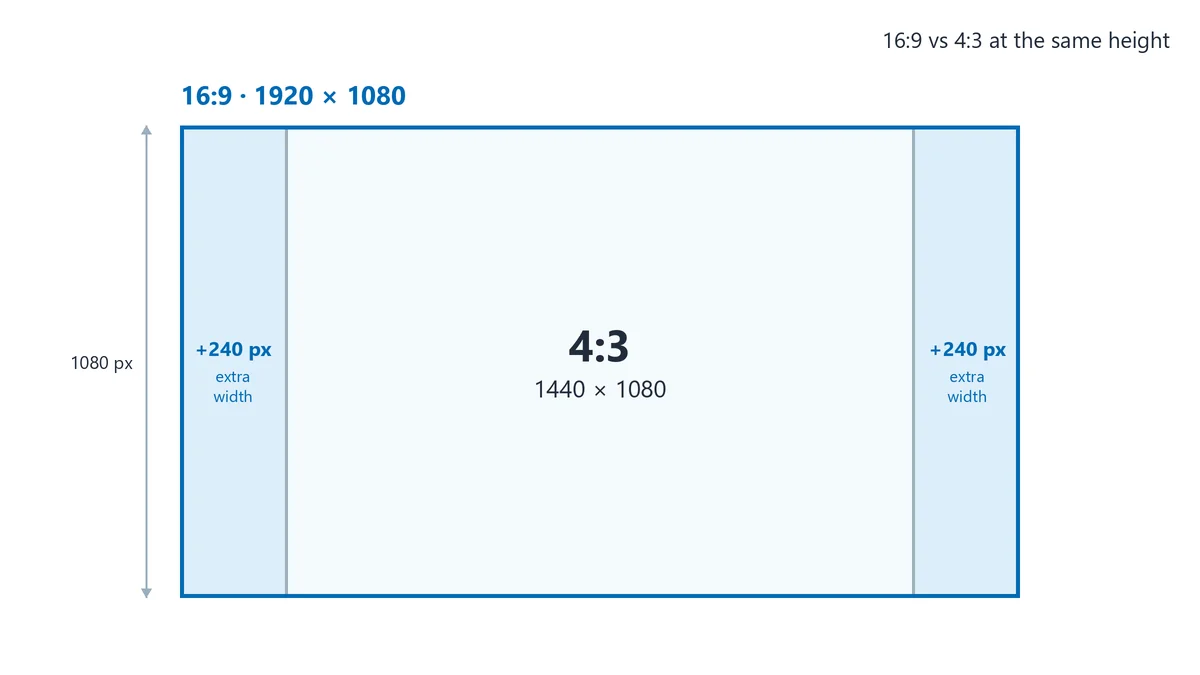
The difference is how wide the frame is for its height. At the same height, 16:9 is a third wider than 4:3, and 21:9 is roughly a third wider again. 16:10 sits in between, a touch taller than 16:9. The easiest way to compare them is to fix the height at 1080 pixels and look at the width.
| Ratio | Decimal | Size at 1080 tall | Where you'll see it |
|---|---|---|---|
| 4:3 | 1.33 | 1440 × 1080 | Old TVs, older monitors, many iPads |
| 16:10 | 1.60 | 1728 × 1080 (1920 × 1200 is common) | Many laptops and office monitors |
| 16:9 | 1.78 | 1920 × 1080 | TVs, monitors, YouTube |
| 21:9 | 2.33 (2.37 for 2560 × 1080) | 2560 × 1080 | Ultrawide monitors, cinema-style video |
For more on the two neighbors, see the 4:3 calculator and the 21:9 calculator. The aspect ratio visualizer lets you lay any two ratios on top of each other.
Is 16:9 better than full screen?
16:9 is better than full screen for anything shown on a modern TV or monitor. "Full screen" was the old name for 4:3, the shape of TVs before HD. A 4:3 picture on a 16:9 screen gets black bars down both sides, while a 16:9 picture fills the whole panel. 4:3 still has a place for retro looks.
Is 16:9 the same as 1.78:1?
Yes, 16:9 is the same as 1.78:1. Divide 16 by 9 and you get 1.7778, which rounds to 1.78. Filmmakers often use the decimal version because it's easier to compare with cinema ratios like 1.85:1 and 2.39:1.
Can you edit on a 16:10 screen and deliver in 16:9?
Yes, you can edit on a 16:10 screen and deliver in 16:9, as long as your project is set to 16:9. 16:10 gives you about 11% more height at the same width (1920 × 1200 vs 1920 × 1080), and most editors use that extra room for the timeline. Your 16:9 preview plays with thin bars above and below, and the exported file isn't affected.
How do you convert a video or image to 16:9?
To convert a video or image to 16:9, you crop it, add bars or reframe it until the width is 1.78 times the height. How much you lose depends on where you start:
- From 4:3: crop the top and bottom. Going from 1440 × 1080 to 1440 × 810 cuts 25% of the height. Or keep the whole picture and add bars down the sides (pillarboxing).
- From 21:9: crop the sides. Going from 2560 × 1080 to 1920 × 1080 cuts 25% of the width. Or keep it all and add bars above and below (letterboxing).
- From 9:16 vertical: cropping would throw away most of the picture. Place the clip in the middle of a 1920 × 1080 frame and fill the sides with a blurred copy.
Whatever you do, don't stretch 4:3 to fill 16:9. Faces get wider and circles turn into ovals, and viewers notice straight away.
Set your project to 16:9 before you start:
- Photoshop: pick the Crop tool, choose Ratio, and type 16 and 9.
- Premiere Pro: create a sequence at 1920 × 1080.
- DaVinci Resolve: set the timeline resolution to 1920 × 1080, or 3840 × 2160 for UHD.
- Canva: start a Presentation (16:9) design, or a custom size of 1920 × 1080 px.
What else do people ask about 16:9?
Is 16:9 the same as 1920x1080?
No, 16:9 and 1920x1080 aren't quite the same thing. 16:9 is the shape, and 1920x1080 is one size in that shape. 1280x720, 2560x1440 and 3840x2160 are also 16:9; they just have fewer or more pixels.
Is 1366x768 16:9?
1366x768 is close to 16:9, but not exact. Its width divided by its height is 1.779, against 1.778 for true 16:9. The difference is less than one pixel across the whole screen, so 16:9 video plays on it without bars you'd notice.
How many pixels is 16:9 4K?
16:9 4K is 3840 × 2160, which is 8,294,400 pixels, or about 8.3 megapixels. That's exactly four times the 2,073,600 pixels in a 1920 × 1080 frame.
What size should a 16:9 wallpaper be?
A 16:9 wallpaper should match your screen's native resolution. That's 1920 × 1080 for a Full HD monitor, 2560 × 1440 for QHD and 3840 × 2160 for 4K. A wallpaper made for a bigger screen scales down cleanly, but a small one stretched across a 4K screen looks soft.
What is 16:9 in cm?
16:9 in cm has no fixed size, because a ratio is a shape, not a measurement. Any print or screen where the height is 56.25% of the width is 16:9, such as 16 × 9 cm, 32 × 18 cm or 48 × 27 cm. A PowerPoint Widescreen slide is 33.867 × 19.05 cm. [3]
What is the best 16:9 resolution for YouTube?
The best 16:9 resolution for YouTube is 1920 × 1080 for most videos. If you shoot in 4K, upload at 3840 × 2160. Don't add your own black bars, because YouTube's player resizes itself to fit your video. [1]
References
- YouTube Help: Video resolution & aspect ratios: https://support.google.com/youtube/answer/6375112
- YouTube Help: Add video thumbnails on YouTube: https://support.google.com/youtube/answer/72431
- Microsoft Support: Change the size of your slides: https://support.microsoft.com/en-us/powerpoint/change-the-size-of-your-powerpoint-slides
- Wikipedia: 16:9 aspect ratio: https://en.wikipedia.org/wiki/16:9_aspect_ratio
Related Aspect Ratio Calculators
Explore our other dedicated calculators for specific aspect ratios:
Aspect Ratio Visualizer
Overlay or compare two ratios side by side
Screen Hub
iPhone, monitor, and web ratio calculators
iPhone Calculator
iPhone display and media ratio reference
Monitor Calculator
16:9, 21:9, and 32:9 resolution converter
Web Design Calculator
OG, hero banner, and card ratio planning
Print Hub
Paper, poster, card, and cover ratio tools
Paper Sizes Calculator
A4, A3, Letter, Legal, and Tabloid ratios
Poster Calculator
ISO and US poster dimension converter
Business Card Calculator
Regional card ratio and bleed planning
Banner Calculator
Web and social cover ratio conversions
Book Cover Calculator
Print, ebook, and audiobook cover sizes
Photography Hub
Camera, film, and print ratio calculators
3:2 Photography Calculator
DSLR and 35mm ratio conversion tool
4:3 Photography Calculator
Micro Four Thirds and digital ratio tool
Medium Format Calculator
6x6, 6x7, and 6x4.5 ratio workflows
Photo Print Sizes Calculator
4x6, 5x7, 8x10 and crop planning
Social Media Hub
Platform ratio guides and calculators
YouTube Social Calculator
Thumbnails, Shorts, and channel image sizes
Instagram Social Calculator
Feed, Stories, and Reels dimensions
TikTok Social Calculator
Vertical-first TikTok video and image sizes
LinkedIn Social Calculator
Post, banner, and profile dimension tool
1.375:1 Calculator
Academy ratio aspect calculator
1.43:1 Calculator
IMAX aspect ratio calculator
1.85:1 Calculator
Theatrical cinema flat format
1.90:1 Calculator
IMAX Digital DCI format
2:1 Calculator
Univisium and 18:9 video format
2.35:1 Calculator
Classic CinemaScope anamorphic
2.39:1 Calculator
Modern anamorphic scope format
2.76:1 Calculator
Ultra Panavision epic cinema format
Anamorphic Calculator
Widescreen scope dimensions (2.39:1, 2.35:1)
Anamorphic Desqueeze Calculator
Desqueeze 1.33x, 1.5x and 2x lens footage
1:1 Calculator
Square social feed video format
9:16 Calculator
Vertical Shorts and Reels format
21:9 Calculator
Ultra-wide display format
32:9 Calculator
Super ultra-wide format
4:3 Calculator
Classic TV and vintage format
4:5 Calculator
Instagram portrait format